
A limit switch may look like a manual device, but it does not work the way many people think. The difference between automatic and manual is subtle but critical. Read on to see how a limit switch actually operates and how to choose the right one for your system.
Quick Comparison: Automatic vs Manual Devices
| Aspect | Limit Switch | Manual Control Switch |
| Trigger method | Machine movement or position | Human action |
| Requires operator input | No | Yes |
| Typical role | Position detection, travel limits | Start, stop, reset |
| Suitable for automation | Yes | No |
| Consistency | Repeatable and automatic | Depends on user |
WHAT A LIMIT SWITCH REALLY IS
A limit switch is a position-sensing device used to detect when a moving part of a machine reaches a specific physical point. When that point is reached, the switch changes its electrical state, sending a signal to a control system.
That signal can be used to:
- Stop motion
- Reverse direction
- Trigger the next step in a sequence
- Send a status signal to a controller
- Prevent overtravel or mechanical damage
The defining feature of a limit switch is that it responds to physical position, not human intention.
WHY A LIMIT SWITCH IS CONSIDERED AUTOMATIC
Triggered by Motion, Not by a Person
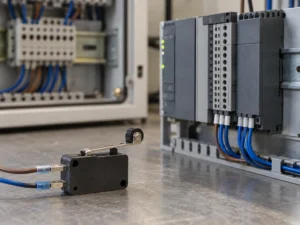
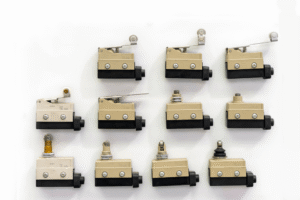
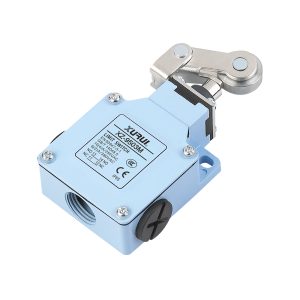
A limit switch activates when a machine part physically contacts its actuator. This could be a cam, lever, roller, plunger, or arm. As the machine moves, the contact happens naturally as part of operation.
No operator decision is required. No button needs to be pressed. If the machine reaches that position, the switch activates every time.
This is the core reason a limit switch is classified as automatic.
Designed for Unattended Operation
Limit switches are commonly used in systems that run without constant human supervision. Conveyors, lifts, automated doors, CNC machines, packaging equipment, and assembly lines all rely on limit switches to operate correctly.
In these environments:
- The machine may cycle hundreds or thousands of times per day
- The switch must activate consistently
- Human interaction is not expected or required
If a device works reliably without an operator present, it is not a manual control.
Integrated into Control Logic
In modern systems, limit switches are often connected to PLCs, relays, or safety circuits. They provide input signals that drive logic decisions automatically.
For example:
- When a carriage reaches the end of its travel, the limit switch tells the controller to stop the motor
- When a door closes fully, the switch confirms it is safe to proceed
- When a platform reaches the top position, the switch enables the next operation
In all cases, the action is automatic and position-based.
Related Reading: What are the 6 types of limit switches?
WHY PEOPLE THINK A LIMIT SWITCH MIGHT BE MANUAL
Mechanical Appearance Causes Confusion
Limit switches often have visible mechanical actuators. Because people associate mechanical movement with human interaction, they sometimes assume the switch is manual.
However, mechanical does not mean manual. Many automatic devices use mechanical contact to sense conditions. The key question is what causes the movement.
If the movement comes from a machine, the operation is automatic.
Can Be Pressed by Hand During Testing
During installation or maintenance, technicians may press a limit switch by hand to test wiring or verify signals. This is practical and normal, but it does not define the switch’s role.
Pressing a limit switch manually during testing is similar to spinning a motor shaft by hand during inspection. It does not change how the component functions in normal operation.
Confusion with Push Buttons and Foot Switches
Push buttons and foot switches are truly manual devices. They exist specifically to capture intentional human input.
Key differences include:
- They do nothing unless a person activates them
- They represent deliberate commands, such as start or stop
- They are part of operator control interfaces
Limit switches do not represent commands. They represent physical conditions.
AUTOMATIC VS MANUAL: THE FUNCTIONAL DIFFERENCE THAT MATTERS
Manual Devices Respond to Intent
Manual switches respond to human intent. A person decides when to press, release, or hold the switch.
Examples include:
- Start buttons
- Emergency stop buttons
- Foot pedals
- Selector switches
These devices are unsuitable for unattended automation because they depend on people.
Limit Switches Respond to Reality
Limit switches respond to reality, not intent. They report what is physically happening in the machine.
They answer questions such as:
- Has the mechanism reached the end?
- Is the door fully closed?
- Is the platform in position?
- Has the actuator moved far enough?
This makes them ideal for automatic control and safety verification.
Related Reading: Is A Limit Switch AC Or DC?
REAL-WORLD APPLICATION EXAMPLES
Conveyor Systems
In a conveyor, a limit switch may detect when an item reaches the end of the belt. The system can then stop the motor or transfer the item automatically.
No operator intervention is required for each cycle.
Lifts and Hoists
Limit switches prevent overtravel by detecting top and bottom positions. If the lift reaches its limit, the switch activates and stops movement.
This function must be automatic to be safe and reliable.
Machine Guarding and Interlocks
Limit switches are often used to confirm that guards or doors are closed. The machine is allowed to run only when the switch indicates the correct position.
The operator may open or close the guard, but the switch itself operates automatically based on position.
WHEN MANUAL INTERACTION IS INVOLVED BUT THE SWITCH IS STILL AUTOMATIC
Installation and Adjustment
During setup, technicians may:
- Adjust the mounting position
- Align the actuator with machine movement
- Test activation points manually
These actions do not make the switch a manual device. They are part of configuration, not operation.
Maintenance and Troubleshooting
Manual activation during troubleshooting is simply a diagnostic method. The switch’s role in the system remains automatic.
HOW TO KNOW IF YOU SHOULD USE A LIMIT SWITCH
A Limit Switch Is the Right Choice If You Need
- Automatic detection of position or travel limits
- A signal triggered by machine movement
- Consistent, repeatable activation
- Integration into automated control systems
A Limit Switch Is Not the Right Choice If You Need
- Human decision-making
- On-demand commands
- Operator-controlled actions
- Intentional start or stop input
Final Thoughts
A limit switch is automatic because it responds to machine position, not human action. If the switch must trigger whenever a part reaches a defined point, it belongs in automated control. If activation depends on a person, it does not. Keeping this distinction clear helps you choose the right device and avoid control or safety mistakes.
XURUI Engineering Team