
We’ve all been there: your hands are flying across the keyboard, your eyes are locked on the screen, and suddenly you need to perform a repetitive command that breaks your entire rhythm. Whether it’s pausing a transcription, toggling a clinical imaging tool, or triggering a macro in a high-stakes raid, taking your hands off your primary tools is a productivity killer.
The solution is literally right under your feet. Multi-pedal foot switches act as a “third hand,” allowing you to offload repetitive tasks to your feet so your hands can stay focused on the precision work. This guide will help you decide between a dual or triple setup to ensure your workflow is seamless, ergonomic, and fast.
Identifying The Right Pedal Count For Your Environment
Choosing the number of pedals isn’t just about “more is better.” It’s about matching the complexity of your software to the physical space under your desk. If you choose too many, you might find yourself “hunting” for the right button; too few, and you’re back to using your hands for those annoying shortcuts.
Strategic Use Cases For Dual Pedal Switches
A Dual Foot Switch is the “sweet spot” for users who need to toggle between two binary states or navigate forward and backward. It is the most ergonomic choice for beginners because the physical gap between the two pedals makes it nearly impossible to mis-click.
- Transcription and Dictation: Map the left pedal to “Rewind” and the right to “Play/Pause.” This allows for a natural rocking motion that matches the rhythm of speech.
- Medical and Dental Imaging: Use one pedal to capture an image and the other to cycle to the next patient record, maintaining a sterile environment.
- Simple Page Turning: For musicians using digital sheet music, a dual pedal is the industry standard for “Page Forward” and “Page Back.”
- Checklist for Dual Pedals: * Do you only have two primary repetitive actions?
- Is your foot space limited by a small desk or computer tower?
- Do you wear heavy boots or wide shoes that might hit multiple buttons on a tighter triple-pedal unit?
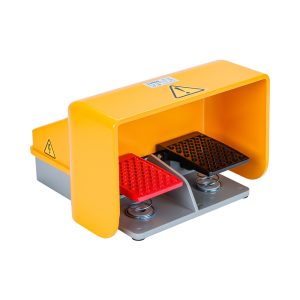
High-Efficiency Scenarios For Triple Pedal Switches
Triple pedals are designed for power users who manage complex workflows. The addition of a middle pedal allows for a “Home” or “Function” key that acts as an anchor for your foot.
- Video Editing and Scrubbing: Map the outer pedals to “J” and “L” (Rewind/Fast Forward) and the center pedal to “K” (Stop/Mark In). This replicates the classic jog-shuttle feel.
- Competitive Gaming: Use the outer pedals for “Lean Left/Right” in shooters and the center pedal for “Push-to-Talk” on Discord. This keeps your WASD fingers free for movement.
- Programming and Debugging: Set the pedals to “Step Over,” “Step Into,” and “Resume.” This allows you to keep your eyes on the code lines while your foot drives the execution.
- Implementation Tip: Always map your most frequently used command to the right-most or center pedal, as these are the most natural resting positions for the human foot.
Related Reading: Is a Footswitch Safe? Everything You Need to Know
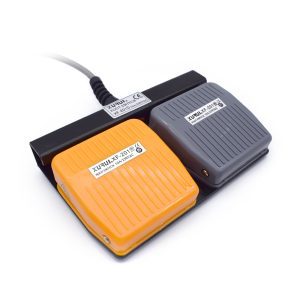
Optimizing Your Setup For Long-Term Comfort
Once you’ve chosen your hardware, the “how” is just as important as the “what.” A poorly placed foot switch can lead to leg fatigue or “pedal drift,” where the unit slowly slides away from you during a shift.
Ergonomic Placement And Foot Positioning
To avoid hip strain, you shouldn’t have to “reach” for your pedals. Your knee should be at a roughly 90-degree angle, with the pedal unit placed where your foot naturally rests when you aren’t thinking about it.
- The Anti-Slip Strategy: Most pedals come with rubber feet, but on carpet or polished wood, they still move. Use a small piece of Velcro tape or a non-slip industrial mat under the unit to lock it in place.
- Hovering vs. Resting: Don’t keep your foot hovering over the pedal; this leads to “drop foot” fatigue. Look for pedals with adjustable tension so you can rest your foot lightly on the switch without triggering it.
Software Customization And Macro Logic
The true power of a multi-pedal switch lies in the software. Most modern switches allow you to program “macros”, a string of commands triggered by one tap.
- Layering Commands: Instead of just mapping “Ctrl,” map “Ctrl+S” (Save). One tap handles the entire save sequence.
- App-Specific Profiles: Ensure your software supports “Auto-Profile Switching.” This means your pedals automatically change from “Undo/Redo” when you’re in Photoshop to “Mute/Unmute” when you switch to a Zoom call.
- Tactile Feedback Tips: If you work in a quiet office, look for “optical” or “silent” switches. If you work in a loud industrial or gaming environment, choose “mechanical” switches that provide a physical “click” you can feel through your shoe.
Final Thoughts: Finding Your Flow
Ultimately, the choice between a dual or triple pedal comes down to the balance between simplicity and power. If you are looking for a fail-proof, ergonomic setup to handle basic toggles, the dual pedal is your best bet; its wide spacing ensures you’ll never hit the wrong command even in the heat of a busy shift. However, if you are a power user managing complex software, the triple pedal provides that essential “home base” to fully offload your workflow. By letting your feet handle the repetitive chores, you aren’t just adding a gadget, you are reclaiming your focus and allowing your hands to stay exactly where they belong: on the creative and precision work that matters most.
XURUI Engineering Team