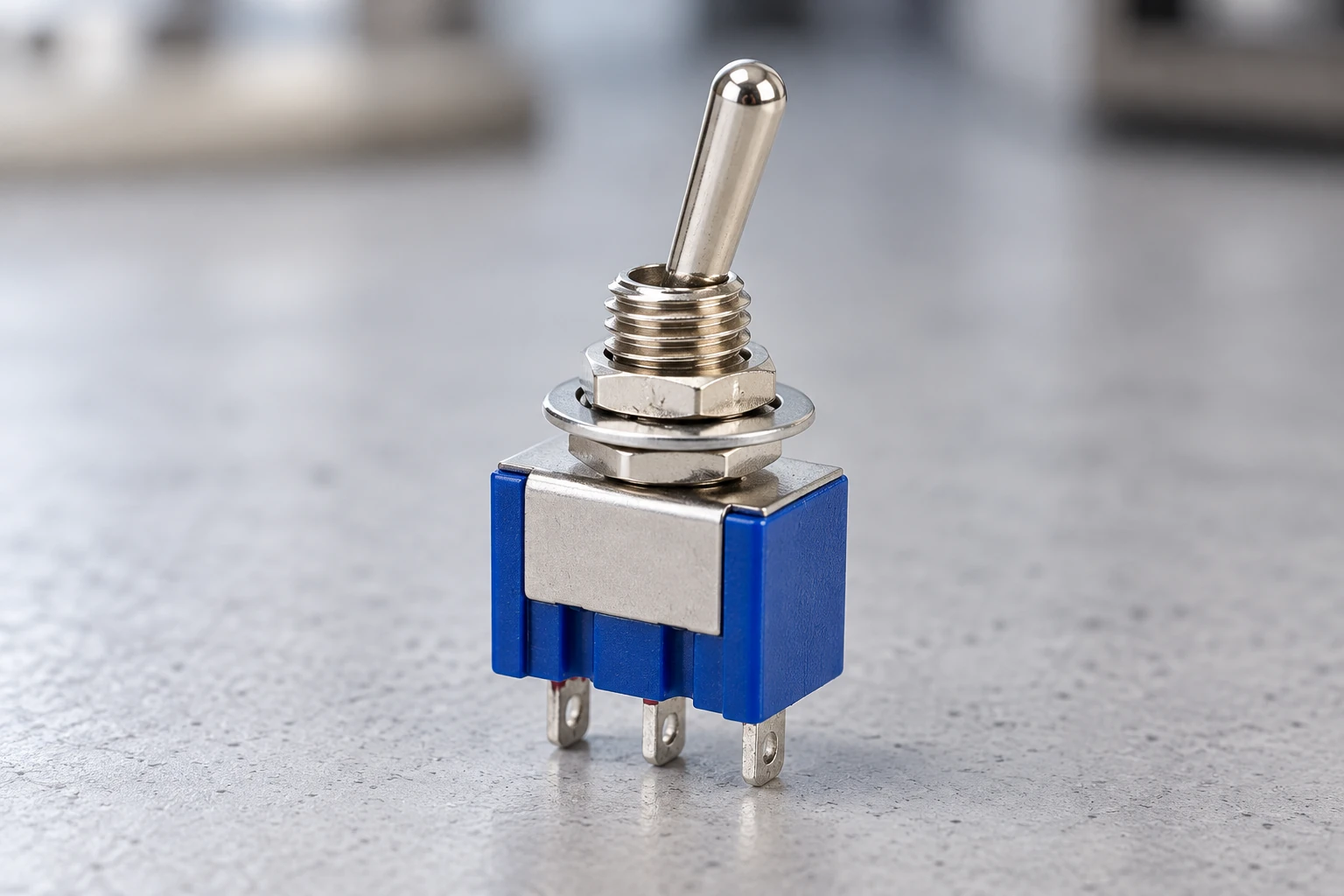
The MTS-102 toggle switch commonly has three terminals and two positions. Its single-pole, double-throw (SPDT) contacts connect one common terminal to either of two paths. It can select between circuits or control a single load using two terminals.
The dimensions below apply to the illustrated solder-terminal MTS-102. Several manufacturers use the same base model name, so electrical rating examples are identified separately.
What Is an MTS-102 Toggle Switch?
An MTS-102 is a miniature toggle switch commonly supplied with SPDT (single-pole, double-throw) contacts. One common contact switches between two paths. The usual switching function is ON-ON, with the lever remaining in either selected position after release.
MTS-102 Pinout and Wiring Diagrams
Identify the contacts before attaching wires. The diagrams below show how the connections work; they do not specify a voltage or approve the switch for a particular load.
Terminal Identification
This guide uses COM for the common terminal and A and B for the switched terminals. These labels describe contact functions, not manufacturer terminal numbers.
To identify the terminals:
- Disconnect power and isolate the switch from other circuit paths.
- Set a multimeter to continuity mode.
- Test each terminal pair in both lever positions.
- Find the terminal that connects to one terminal in the first position and the other in the second. This is COM.
A working ON-ON switch should give the following results:
| Lever Position | COM–A | COM–B |
| Position A | Closed | Open |
| Position B | Open | Closed |
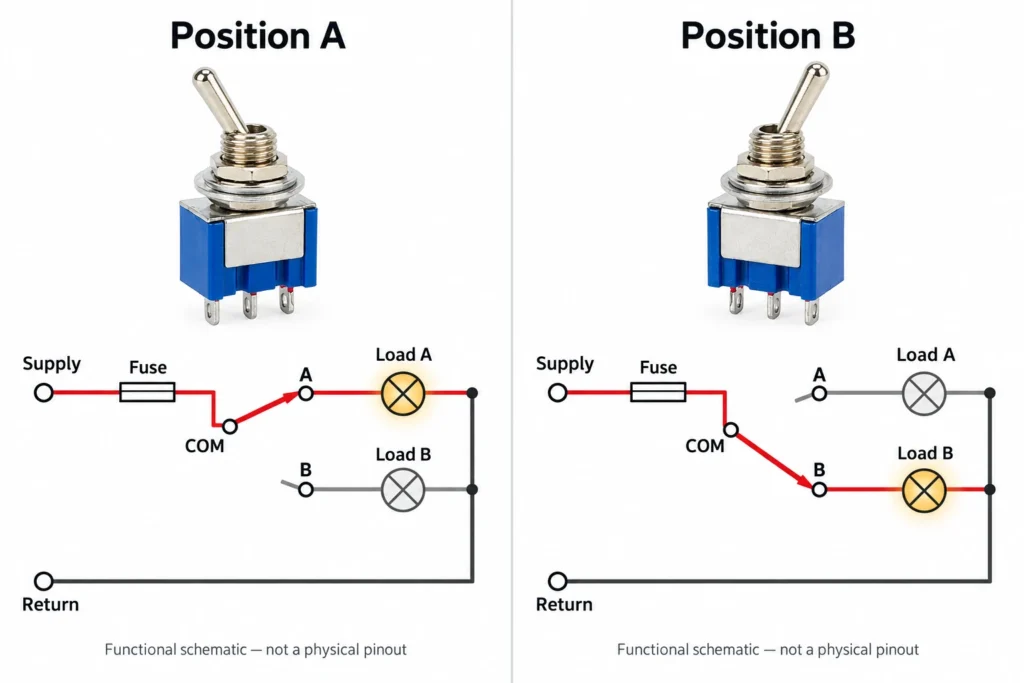
Mark whether a physical pinout drawing shows the front, rear, or bottom of the switch. Changing the viewing direction can reverse the apparent left and right terminals.
A toggle switch schematic shows the contacts in a stated reference position. Using COM, A, and B avoids assigning a default rest position to this maintained ON-ON switch. Continuity testing establishes which contacts connect in each stable position; it does not verify current capacity or insulation performance.
Changeover Wiring
Connect COM to a protected supply, then connect A and B to separate loads with the appropriate return path.
- Position A:
- Supply ── Fuse ── COM ── A ── Load A ── Return
- B ── Load B ── Return
- ↑ Open at the switch
- Position B:
- A ── Load A ── Return
- ↑ Open at the switch
- Supply ── Fuse ── COM ── B ── Load B ── Return
Moving the lever transfers the supply connection from one load to the other. Choose the fuse to suit the circuit’s wiring and protection needs. Both examples use a single supply. Switching between independent power sources requires a switch suitable for that duty. ON-ON notation alone does not tell you the order in which contacts open and close while the lever moves.
ON-OFF Wiring
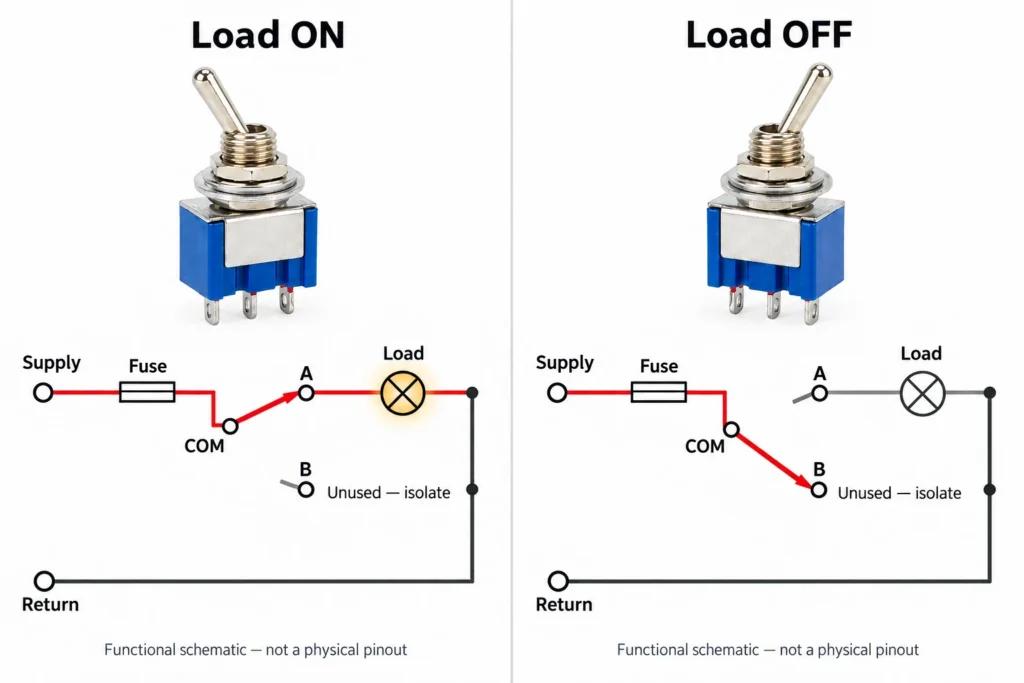
Connect COM and one switched terminal to control a single load. Leave the remaining terminal unconnected and protect it against accidental contact.
- ON: Supply ── Fuse ── COM ── A ── Load ── Return
- OFF: Supply ── Fuse ── COM ── B Unconnected
- A ── Load ── Return
In the OFF position, COM connects to unused terminal B, opening the path to the load. This gives the circuit ON-OFF control while the switch itself retains its ON-ON contact arrangement. The third terminal is a switched contact, not a dedicated ground connection. COM identifies the shared contact; its role as a positive, negative, input, or output connection comes from the circuit.
MTS-102 Dimensions and Panel Mounting
These dimensions come from the drawing of the illustrated solder-terminal version. They apply to that version and should not be assumed for every switch marked MTS-102.
| Dimension | XURUI MTS-102 |
| Body Width | 13 mm |
| Body Thickness | 7.8 mm |
| Body Height | 9.5 mm |
| Adjacent Terminal Center Spacing | 4.5 mm |
| Lever Length Shown | 10 mm |
| Terminal Projection Shown | 4 mm |
| Mounting Thread Designation | M6 |
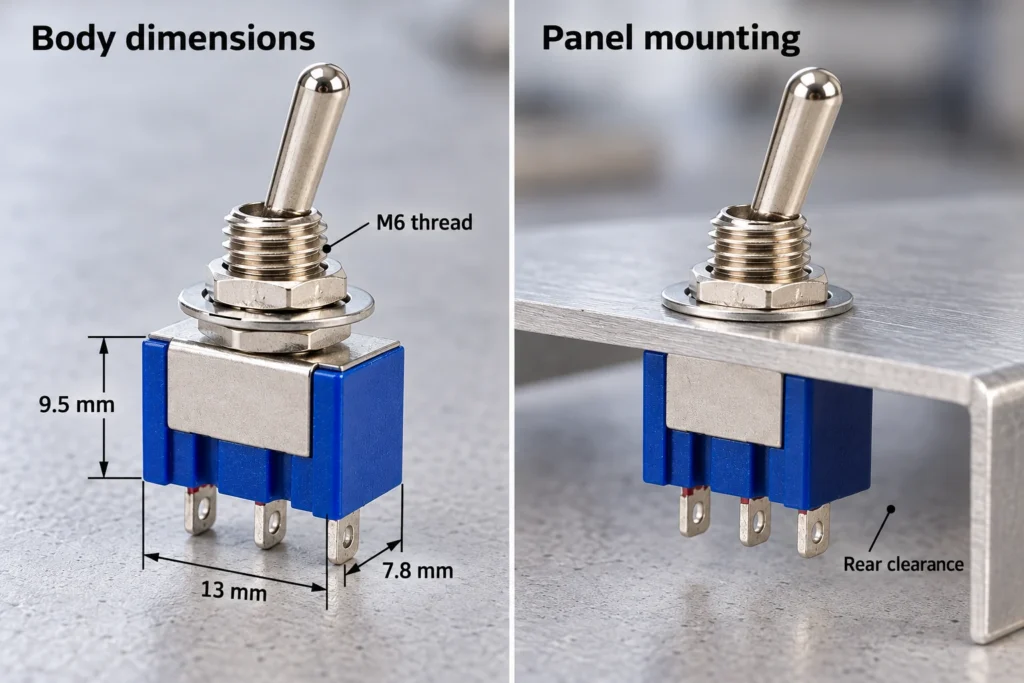
The body dimensions exclude the complete lever and mounting assembly. Use the full drawing to check clearance above and behind the panel. M6 identifies the mounting thread, but it does not specify the finished panel-hole tolerance. Before drilling production panels, obtain the recommended cutout and maximum panel thickness for the exact version.
Include paint, labels, washers, and overlays in the panel thickness. The threaded bushing must project far enough for the mounting hardware to seat properly. These panel thickness and mounting checks also help identify interference with nearby components. Allow space behind the terminals for insulation and wire routing. Support the wires so cable movement does not pull on the solder lugs.
MTS-102 Electrical Ratings
Electrical ratings define the conditions under which a switch can operate. Read the current and voltage together, then account for what the load does when it starts and stops.
Current and Voltage Ratings
Daier’s published MTS-102 specification lists 6A at 125VAC and 3A at 250VAC. These are separate operating points for that manufacturer’s version. Do not calculate other permitted combinations from a constant-power assumption. Lowering the voltage does not automatically allow a higher switching current.
An AC rating also does not establish a DC rating. AC current regularly crosses zero, helping an arc extinguish. DC lacks those crossings, so an arc can persist as the contacts open. For DC use, obtain the permitted voltage, current, and load category for the exact switch.
Load Type and Inrush Current
A switch must handle the load’s starting and stopping conditions as well as its normal running current. Inrush current is the brief surge some loads draw when energized.
A motor may draw more current during startup than while running. A coil or another inductive load can generate a voltage surge when disconnected. These conditions can increase contact wear or cause the contacts to weld.
If the load exceeds the switch’s documented switching duty, use a suitably rated relay or contactor to carry it. The toggle can then operate the control circuit, provided that control load also falls within its rating.
Differences Between MTS-102 and MTS-103
The usual difference is the center-OFF position. MTS-102 switches between two paths, while MTS-103 adds a position that disconnects both.
| Model | Switching Function | Stable Positions | Center OFF |
| MTS-102 | ON-ON | 2 | No |
| MTS-103 | ON-OFF-ON | 3 | Yes |
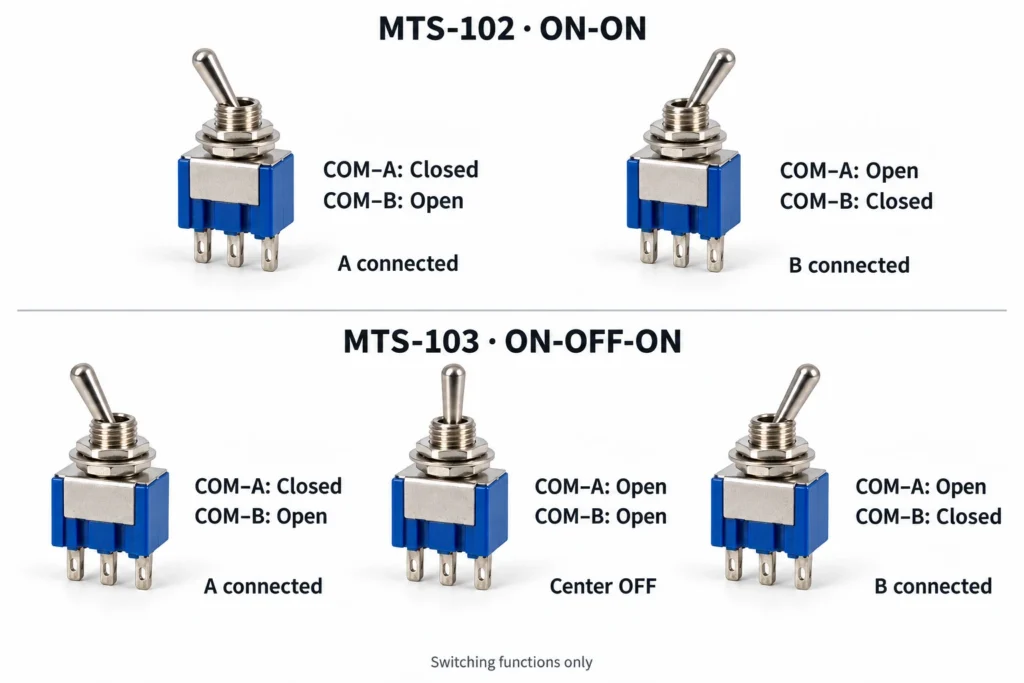
Choose MTS-102 when the operator needs to select one of two paths without a center stop. MTS-103 suits controls that also need a deliberate position with neither path connected. The switching function does not establish whether two versions have matching dimensions or ratings. Compare the complete manufacturer codes before choosing a replacement.
For a compatibility review, provide the complete model code, load voltage and current, load type, panel thickness, and required switching function.
Frequently Asked Questions
Is an MTS-102 Toggle Switch Waterproof?
The MTS-102 designation alone does not establish waterproof protection. For an exposed installation, choose a version with a documented water-ingress rating that covers the installed assembly. A rubber boot may protect the lever opening while leaving the rear terminals exposed, so it does not automatically make the entire switch waterproof.
How Should Spare MTS-102 Switches Be Stored?
Keep spare switches in their original protective packaging in a dry indoor location, away from heat, direct sunlight, and corrosive gases. Protect the terminals from bending, and keep heavy objects off the packages. Follow any model-specific storage limits supplied by the manufacturer; operating-temperature limits do not serve as storage instructions.
Can the Lever on an MTS-102 Be Replaced Separately?
Replace the complete switch if its metal lever is damaged, unless the manufacturer provides a lever replacement procedure for that version. Avoid opening the housing or forcing the mechanism to accept a substitute lever. A removable external cap, where fitted, is a separate part from the metal lever that operates the contacts.
External Sources
- Daier MTS-102 Specifications and Switching Functions
- OMRON Safety Precautions for Basic Switches
- NKK Switches Product Safety Precautions and Storage Guidance