
In industrial operations, your hands should be for creating, not toggling switches. Reaching for manual buttons breaks rhythm and slows production.
This guide explores how the right foot switch eliminates wasted motion to transform your workflow into a seamless operation.
Why Hands-Free Control Is a Real Operational Advantage
A foot switch isn’t just “a button on the floor.” It changes your process from serial to parallel:
- Serial control (manual button): position part → move a hand to trigger → return hand to the work → start the task
- Parallel control (foot switch): keep both hands positioning and stabilizing → trigger instantly with your foot → task starts at the exact ready moment
That one shift—keeping both hands on the work—creates better rhythm, fewer pauses, and more consistent output, especially in repetitive or high-volume environments.
Maximizing Throughput With a Foot Switch Workflow
The most immediate benefit of a foot switch is eliminating the “reach and return” cycle. In a standard setup, an operator must position a workpiece, move one hand to hit a button, and then reposition before starting the task. With a foot switch, the operator can hold a component with both hands, align it perfectly, and trigger the machine the moment they’re ready.
That synchronized “hands stabilize + foot triggers” pattern creates a seamless, repeatable rhythm and can reduce cycle time significantly in high-volume assembly environments.
Pro Tip for fast-paced shops:
If your task requires high precision, choose a momentary foot switch. It stays “On” only while your foot is actively pressing, giving you instinctive timing control and reducing risk in stop-start work.
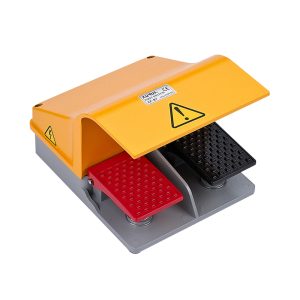
Reducing the Hidden Cost of Operator Fatigue
Speed matters, but sustainable speed matters more. Repetitive strain injuries and fatigue don’t just impact health—they quietly drive errors, rework, and turnover.
A manual button often requires repetitive thumb triggering, awkward reaching, or breaking hand positioning. A well-placed ergonomic foot switch redistributes workload to larger leg muscle groups and lets hands stay in a stable, controlled position.
The Reach Audit:
Watch your operators. If they’re reaching more than 15 inches outside the primary work zone to hit a button more than 40 times per hour, they’re at higher risk of strain—and you’re paying an efficiency tax every shift. Moving control to a floor-mounted industrial foot switch is both a productivity upgrade and a long-term investment in workforce health.
Related Reading: What is a Foot Switch Used For?
Precision Control Starts With the Right Foot Switch
Modern foot switches go far beyond basic “click-clack” control. Today’s options support more nuanced timing, better ergonomics, and better process control.
Momentary vs Maintained: Timing Matters
- Momentary: machine runs only while the pedal is pressed; stops immediately when released
- Maintained: one press turns it on, another turns it off (or it stays on until a separate stop)
If your operation requires exact start/stop timing—or you want a natural safety layer—momentary control is often the best default.
Variable Speed for Delicate Tasks
For welding, grinding, polishing, or any application where “On/Off” is too blunt, a potentiometer foot switch acts like a car’s gas pedal. Operators can “feather” power—ramping speed up or down based on material resistance, without moving their hands away from the work.
Sterile Efficiency in Medical Settings
In dental offices and surgical suites, productivity is tightly linked to hygiene. Touching manual controls can force re-sterilization breaks. A medical-grade foot switch allows adjustments to lasers or imaging equipment without breaking the sterile field, keeping procedures safer and more continuous.
Safety That Actually Increases Speed
A common misconception is that safety features slow production. In reality, confidence creates speed. When operators trust the control method, they move faster and make fewer cautious micro-pauses.
Guarded Foot Switches Prevent Accidental Activation
A guarded (shrouded) foot switch provides a physical “home” for the foot, reducing accidental triggers from falling tools, stray footsteps, or cluttered work areas.
Dead-Man Function in High-Risk Work
In many heavy-machinery setups, the foot switch behaves like a dead-man control: the moment the operator steps away or loses footing, the machine halts. That response is often faster than reaching for an emergency stop during a stressful moment.
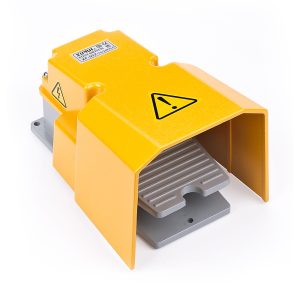
Step-By-Step Decision Guide: Choosing the Right Foot Switch
Not every pedal fits every floor. Use this checklist to avoid mismatches and rework.
1) Define the Action
- Need the machine to stay on after one click? Choose a maintained foot switch.
- Need it to stop the moment you lift your foot? Choose a momentary foot switch.
2) Choose the Control Type
- Simple trigger only? A standard electric foot switch works.
- Need to control power level/speed? Choose a variable speed (potentiometer) foot switch.
3) Confirm Electrical Compatibility
Before buying, confirm what your equipment expects:
- NO vs NC (normally open vs normally closed)
- dry contact vs powered output requirements
- connector/terminal type and voltage/current rating
This one step prevents a lot of “it arrived but doesn’t integrate” problems.
4) Evaluate the Environment
- Clean offices/labs: lightweight plastic housing may be fine
- Machine shops (oil, chips, heavy boots): choose rugged construction and appropriate ingress protection (e.g., higher IP ratings)
5) Prioritize Safety
If there’s any risk of injury or accidental firing, choose a guarded foot switch.
6) Consider Mobility and Trip Hazards
If workstations move often, a wireless foot switch can reduce cable clutter and trip risks. If the station is fixed, plan cable routing and floor placement to keep the work area clean.
Implementation Tips: Get the Gains Without Disrupting the Line
A foot switch delivers the best ROI when it’s deployed thoughtfully—not randomly.
Start With a Bottleneck Workstation
Pick one high-frequency station where operators trigger a control repeatedly and hand positioning matters. Prove the gain there first, then scale.
Standardize Placement
Place the pedal where the operator can find it without looking. Consistent placement improves rhythm and reduces hesitation.
Train for Rhythm, Not Just “How to Press It”
The goal is a smooth loop: hands position → foot triggers → hands maintain control → repeat. That’s where cycle time and quality improvements come from.
Final Thoughts: Stepping Toward Efficiency
Integrating a foot switch is more than a hardware upgrade, it’s a shift toward a more ergonomic, responsive, and repeatable workflow. By moving control from fingers to feet, you reclaim wasted seconds, reduce fatigue, and create safer working conditions.
Whether you’re managing a high-volume assembly line or a sterile medical suite, the right foot switch keeps your hands focused on what matters most: the work itself.
XURUI Engineering Team