
To test a 3-wire DC proximity switch, check its supply voltage and output while moving a suitable target into and out of sensing range. On a normally open model, the output should switch on when the target enters range.
These steps cover 24 V DC inductive sensors with PNP or NPN outputs. Check the model label or wiring diagram to confirm that it accepts 24 V and to identify whether its output is normally open or normally closed.
Wire Color Codes and Pinout for a 3-Wire Proximity Switch
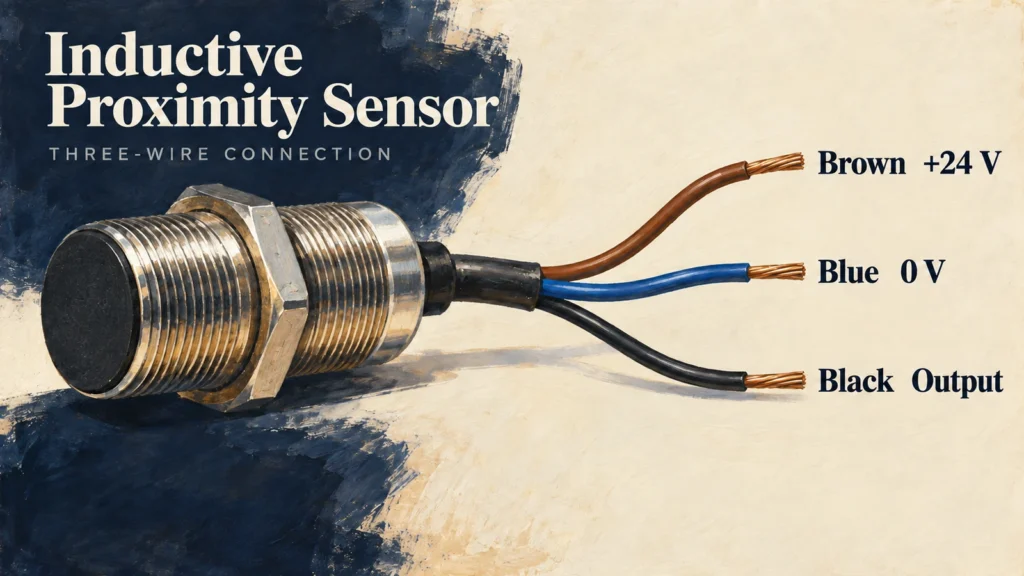
On many 3-wire DC sensors, brown carries positive supply, blue is 0 V, and black is the switched output. Follow the wiring diagram for the exact model; connector pin assignments can vary.
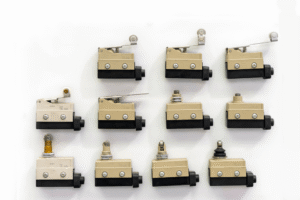
A PNP output switches the signal toward positive voltage when active, while an NPN output pulls it toward 0 V. A limit switch uses mechanically operated contacts, so its terminal arrangement and test procedure differ from those of a 3-wire sensor.
Tools You Need for Testing
Gather these items before testing so you can check both the supply and the switched output with a load connected:
- A digital multimeter set to DC voltage. Do not use resistance or continuity mode on an energized sensor.
- A 24 V DC power supply, if 24 V falls within the sensor’s rated supply range.
- A steel target at least as large as the model’s specified reference target, if that size is listed.
- A compatible load. A programmable logic controller (PLC) DC input can serve as the load. For a bench test, a 4.7 kΩ, 0.5 W resistor draws about 5 mA at 24 V. Confirm that the sensor can drive this current. Without a load, a transistor output may float and give an unreliable meter reading.
How to Test a 3-Wire DC Proximity Switch
Test the powered sensor’s output voltage with a compatible load connected as the target moves into and out of range. The difference between limit switches and proximity sensors matters because PNP and NPN sensors have transistor outputs, while limit switches use mechanical contacts and require a different test.
The steps below cover a normally open output and measure the black sensor wire relative to blue. On a normally closed model, the output states reverse when the target enters and leaves the sensing range.
Testing PNP Proximity Switches
- With the power off, connect brown to +24 V and blue to 0 V. Connect the compatible load between black and blue.
- Set the meter to DC volts. Connect its COM lead to blue and its positive lead to brown. Turn on the sensor and confirm the rated supply voltage. Move the positive probe from brown to the black output wire.
- Move the steel target into the specified sensing range. The black-to-blue reading should rise from near 0 V toward the supply voltage. Remove the target; the reading should fall again.
The active output may read slightly below the supply voltage because of the sensor’s internal voltage drop. If the reading does not change, check the target position, load, and wiring against the model diagram.

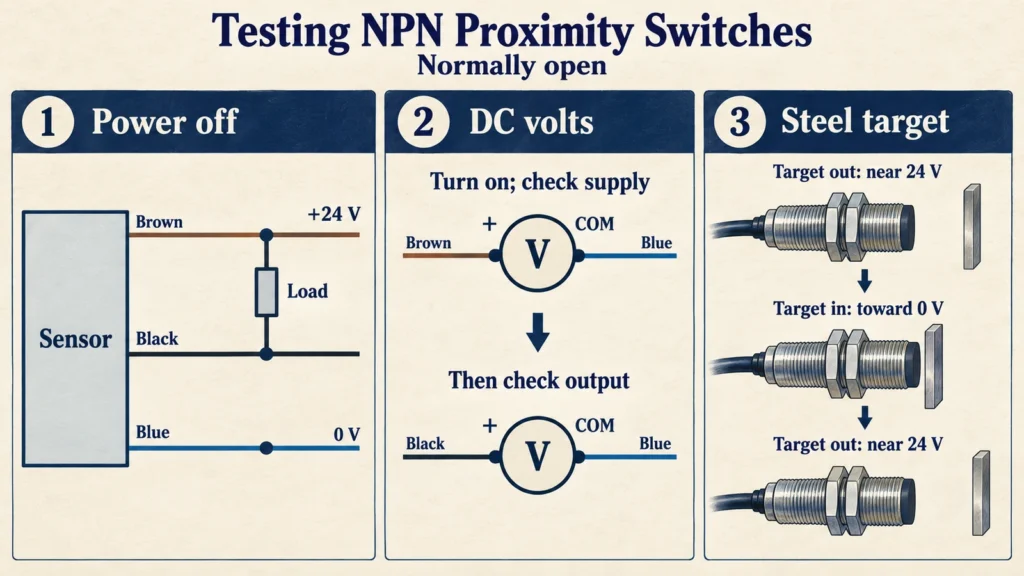
Testing NPN Proximity Switches
- With the power off, connect brown to +24 V and blue to 0 V. Connect the compatible load between brown and black.
- Set the meter to DC volts. Connect its COM lead to blue and its positive lead to brown. Turn on the sensor and confirm the rated supply voltage. Move the positive probe from brown to the black output wire.
- With no target present, black should read near the supply voltage through the load. When the target enters range, the reading should fall toward 0 V. Removing the target should bring it back up.
An NPN output needs a load connected toward positive supply for this reading to be meaningful. Do not connect black directly to a supply rail instead of using a load.
How to Test a Proximity Switch Without Removing It
Test the installed sensor with its normal load connected. Stop and secure the equipment against unexpected movement, then measure the supply at the sensor between brown and blue. Keep the meter’s COM lead on blue and measure the black output wire as the target enters and leaves the sensing zone.
If the output changes at the sensor but the PLC does not respond, measure the signal at the PLC input terminal. This helps locate a cable, connection, or input-circuit fault. A static test confirms switching at the positions checked; it does not show whether the sensor will detect a target moving at operating speed.
Three Common Proximity Switch Problems
Use voltage readings to find where the expected state change stops. Check the model documentation to see whether its indicator LED shows power, target detection, or output state.
Case 1: The LED is ON, but the PLC receives no signal.
Measure the signal at the sensor and then at the PLC terminal while moving the target. If it changes at the sensor but not at the PLC, inspect the cable and terminals. If it reaches the input terminal, check the input common and confirm that the module accepts the sensor’s PNP or NPN output. The PNP and NPN PLC input guide covers the current paths and input checks.
Case 2: Sensor stays ON all the time.
First check whether the sensor is normally open or normally closed. An NC model should be ON with the target absent and OFF when the target is detected. Test both positions. If the loaded output stays ON in both, clear metal chips from the sensing face and check for nearby mounting metal, a shorted signal wire, or a damaged output.
Case 3: Short sensing range.
Compare the result with the target and mounting conditions specified for the model. Use a steel target of the required size, check the sensor’s position and supply voltage, and inspect its sensing face. Small targets and some nonferrous metals can reduce sensing distance; nearby metal can also shift the switching point. If the sensor still fails under its specified test conditions, it may need replacement.

If replacement is needed, submit the model and application details to XURUI for a compatibility review. Include the supply range, PNP or NPN output, NO or NC operation, target material, required sensing distance, and PLC input type.
FAQs
How Do I Test a Proximity Switch Without an Indicator LED?
Measure the loaded output voltage with the target absent and present. On a normally open 24 V PNP switch, black-to-blue voltage should rise toward 24 V when the target is detected. On an NPN switch with its load connected toward positive supply, it should fall toward 0 V. Confirm the output type before interpreting the readings.
How Can I Tell Whether a Proximity Switch Is Normally Open or Normally Closed?
A normally open output is inactive when the target is absent and active when it is detected. A normally closed output does the reverse. Check the loaded output in both positions, then compare the result with the model marking or datasheet. The LED alone may not show the contact logic.
Can a Proximity Switch Pass a Static Test but Miss Fast-Moving Targets?
Yes. A stationary target can switch the output clearly, while a fast-moving target may produce a pulse too brief for the sensor or PLC input to register. Test at the actual target speed and gap, then compare the pulse duration with the sensor’s response specification and the PLC input settings.
External Sources
- Balluff: How Do I Wire My 3-Wire Sensors?
- Balluff: Electrical Wiring of Sensors
- OMRON: Proximity Sensor Safety Precautions
- OMRON: E2B Cylindrical Proximity Sensor Specifications